AI Takeoff for Home Builders: Plans & Schedules to Excel
By Floor Plan Analyzer, an AxcelerateAI practice
Home builders need quantities for the exact home being built: the right model, elevation, options and drawing issue. A spreadsheet full of detected objects is useful only when those records map to the builder’s estimating system and can be checked against the drawings.
This guide follows that handoff from multi-page plans and schedules to reviewed Excel-ready records. It includes a fictional option example, a downloadable CSV and a practical checklist for evaluating a custom pipeline.
How does AI takeoff work for home builders?
A custom pipeline identifies the relevant views, reads labels and schedules, proposes measurements, applies the selected model and options, and maps supported quantities into the builder’s template. Estimators review the source evidence and exceptions before release. Drawing extraction does not establish missing specifications, supplier prices or a complete purchase order.
- Lock the model, elevation, options and revision before summing quantities.
- Separate measured geometry, assembly rules, procurement and pricing.
- Export evidence and review status alongside the numbers.
Download the fictional home-builder takeoff review CSV
Start with the workbook your estimators already use
A home builder’s takeoff has to fit the way the business sells and builds homes. One drawing package may cover a base model, optional rooms, several elevations and a mirrored layout. A useful export identifies the selected configuration before it adds quantities together. Otherwise a plausible spreadsheet can price work that is not in the home being built.
Begin with an anonymised estimating template and a completed example. Agree the destination tabs, cost codes, unit conventions, trade boundaries and the person who releases quantities. Separate measured geometry from purchased materials, labour allowances and selling prices. Your existing workbook remains the commercial calculation layer unless the project explicitly includes changing it.
The recommendations in this guide describe a custom engineering workflow. Floor Plan Analyzer is AxcelerateAI’s drawing-intelligence practice: we fine-tune our models on your drawings and build the review and export steps around your team. This is not a universal residential price book or a self-serve subscription promise.
What can be extracted from a residential drawing set?
Useful starting scopes include room polygons, floor areas, labelled wall runs, door and window instances, and the schedule rows that describe those instances. Each requires a definition. A room area measured to a finish face is different from an exterior building footprint; a door opening may contain two leaves; a window type can occur many times.
Only include a quantity when the source supports it. Foundation concrete needs dimensions and relevant sections. Roofing needs the specified geometry and treatment of slope, not just a floor footprint. Framing needs structural layouts, specifications and agreed assembly rules. A floor plan alone does not establish every material needed to build the home.
| Scope | Evidence needed | Agree before calculating |
|---|---|---|
| Room finishes | Room boundary plus finish schedule | Material assignment, measurement boundary, exclusions |
| Doors and windows | Plan instances linked to schedule types | Opening count, leaves or units, selected elevation |
| Wall linings | Wall run plus height and type details | Side, layers, deductions and separate products |
| Concrete or roofing | Relevant structural or roof information | Depth, slope, details and scope sufficiency |
Lock the model, elevation, options and issue first
Use a configuration key such as model HB-01 / elevation A / option SUN selected / revision R02. These names are fictional examples, not a prescribed software format. Keep lot-specific information separate from the reusable model: a foundation condition on one lot must not silently become the standard quantity for every home.
Create a sheet register with file version, sheet number, title, issue date and role. Classify floor plans, elevations, sections, schedules, details, option sheets and superseded issues. Read the index and relevant notes, then shortlist the views that actually describe the selected home. OCR helps find text and tags; it does not decide which commercial option the buyer purchased.
Record mutually exclusive choices explicitly. A sunroom that replaces a patio is not simply an extra room added to the base. A selected elevation may replace window types. Mirroring can preserve some totals while changing handing, room relationships or schedule links. Reuse measurements only after confirming what the variation changes.
Calibrate the view before measuring it
Check the units and a known dimension for each view used in measurement. Do not assume a PDF page, a printed scale label and an enlarged detail all share the same scale. Bluebeam’s measurement documentation supports page calibration, separate horizontal and vertical scales, and viewports for differently scaled areas. This is why the data model needs view-level scale evidence.
For a custom pipeline, preserve the calibration anchors and the resulting conversion from drawing coordinates to real units. A scan that stretches differently along each axis needs investigation rather than a confident single scale. If the scale cannot be validated, keep the affected geometry on hold and let a reviewer resolve it.
References: Bluebeam: page scales, calibration and viewports
Link plan instances to schedules without counting twice
Detect each opening as an instance with an ID, level and location. Then connect the nearby tag to a schedule row that describes its type. A type row is a definition, not an extra physical window. Repeated symbols in a legend, an elevation and the plan can all describe the same object.
Store the original tag alongside its normalised value. Tags such as 001 or W-01 need to survive export unchanged. When a tag is unreadable, a schedule row is missing or multiple rows match, keep the candidate links and an exception reason. Do not replace a missing quantity or size with zero: zero is a resolved number with a different meaning.
Reconcile in both directions: plan instances without schedule definitions and schedule types without plan instances. The second group can include unused options, not necessarily omissions. The selected configuration and source context decide which items belong in the estimate.
Worked example: select one configuration before summing
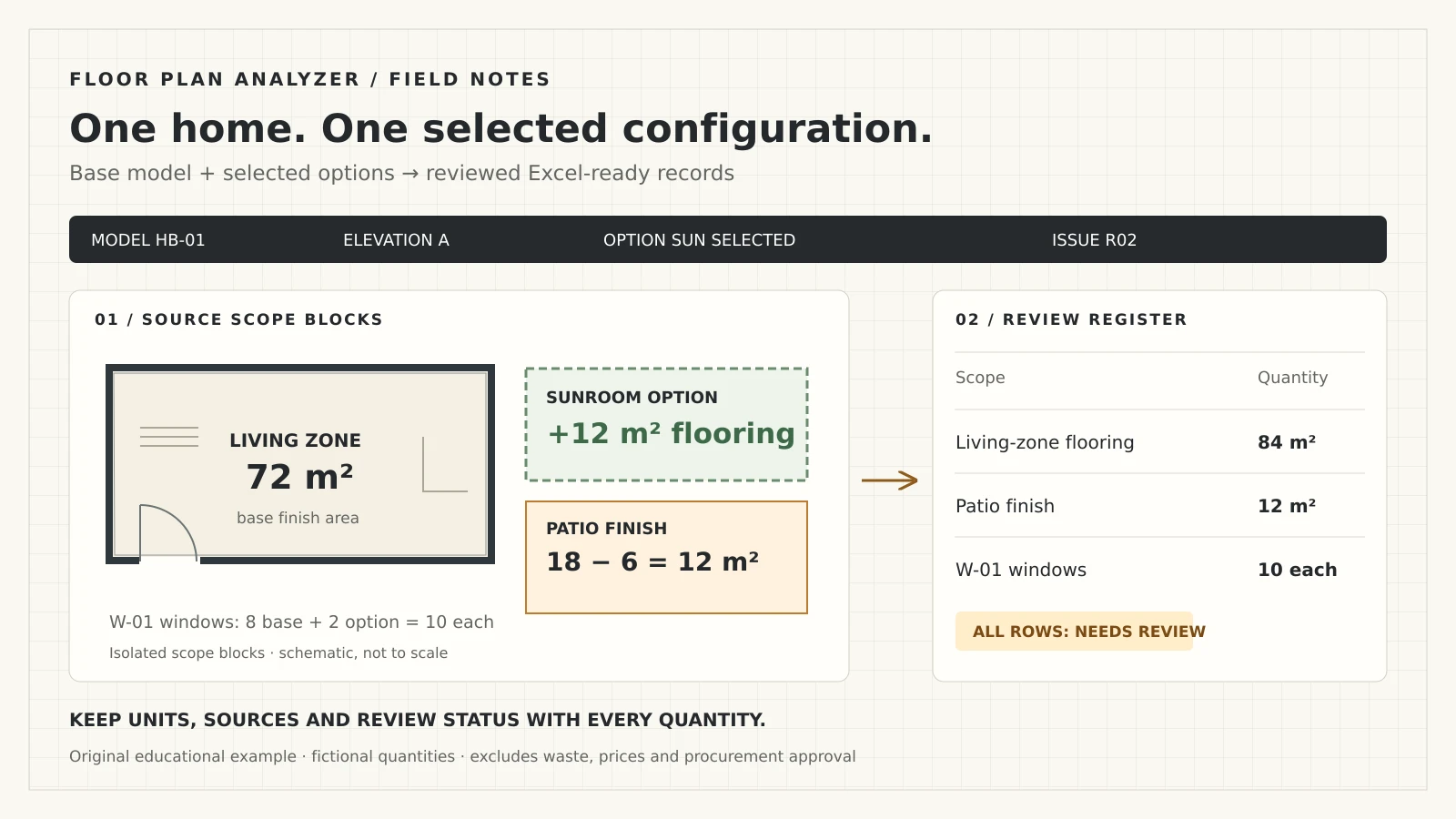
Consider a fictional single-storey model HB-01, elevation A, with an optional sunroom. The base has 72 m² of living-zone flooring. The sunroom adds 12 m² of the same finish, and its selection removes 6 m² of patio finish. The base has eight W-01 windows; the option adds two. These are invented teaching quantities, not client drawings or a model benchmark.
For the sunroom selection, living-zone flooring is 72 + 12 = 84 m². Patio finish is 18 − 6 = 12 m². W-01 is 8 + 2 = 10 each. Without the option, the quantities remain 72 m², 18 m² and eight respectively. Never add ten windows to 84 m² as a combined takeoff total: aggregate only compatible units and scope.
The downloadable CSV contains six base/delta rows, with configuration, source references, fictitious cost codes, units and review flags. Every row starts as Needs review. The option deltas are signed scope changes, not negative purchase orders. Excluded quantities, waste, prices and supplier ordering rules are not inferred.
| Separate scope | Base | Sunroom delta | Selected configuration |
|---|---|---|---|
| Living-zone flooring | 72 m² | +12 m² | 84 m² |
| Patio finish | 18 m² | −6 m² | 12 m² |
| W-01 windows | 8 each | +2 each | 10 each |
Map accepted quantities to cost codes and assemblies
Build a mapping table from source classifications to the builder’s own cost code, item description and unit. A room named Study might map to a selected finish; the name alone does not establish the specification. Keep measured area, material assignment and any allowance in separate fields so a reviewer can see how the output was derived.
An assembly expands a defined unit into its component quantities. Buildxact’s official documentation illustrates assemblies measured by each, area or length and requires quantity and unit fields for their items. Its import process also includes field mapping and an import preview. That supports treating the target schema as a contract, rather than assuming every estimator accepts the same spreadsheet.
If you use a builder-approved flooring allowance, show it as a separate rule after net measurement. Keep supplier pack sizes and rounding at the procurement stage. Do not make a universal waste percentage part of the AI model: the right treatment depends on the material, layout, specification and estimator’s policy.
References: Buildxact: assembly units and Excel import mapping
Design an Excel handoff that survives review and re-runs
For a production integration, agree whether the result is a native workbook copied from your approved template, a CSV imported into it, or an API payload consumed by your estimating system. A CSV is a flat exchange file: it does not carry workbook formatting, formulas or multiple tabs. This guide’s CSV is an educational review register, not a ready-to-order bill of materials.
An output contract should retain stable record IDs, configuration, revision, quantity, unit, source sheet and location, calculation rule, review status and release identity. Keep source records in a detail table and totals in a separate view. On re-run, update by stable keys; do not append a second copy of the same home and double its quantities.
In Excel, import the example with Data → From Text/CSV and inspect types before loading. Preserve tags, lot IDs and cost codes as text, including leading zeros. Check the decimal and delimiter settings. Microsoft documents that direct CSV opening uses default interpretation settings, which can change values such as codes with leading zeros.
| Field group | Recommended fields | Purpose |
|---|---|---|
| Identity | Record ID, model, elevation, lot, options, revision | Prevent mixing configurations or duplicating re-runs |
| Measurement | Quantity, unit, rule and original evidence | Explain what was measured and calculated |
| Mapping | Cost code, product or assembly reference | Connect to the estimating template |
| Release | Status, exception, reviewer and approved issue | Separate proposed quantities from accepted output |
References: Microsoft: importing text and CSV files into Excel
Keep revisions separate from customer selections
A drawing revision changes the source package. A selected option changes the configuration being built. A post-contract customer change introduces a commercial approval process. Track these as different events, even when all three affect the same room.
Compare equivalent configurations between issued sets. Mark records as added, removed, modified or unchanged, with the old and new source evidence. A moved tag is not automatically a new window. A renumbered schedule type is not automatically a different product. Review uncertain matches rather than presenting a fabricated precise change total.
Preserve the last released export. Generate a proposed replacement and a delta report; require approval before it enters purchasing or the estimate. If the destination has no update API, agree an import and replacement procedure with the team that owns it.
Use an exception queue instead of silently completing blanks
Examples of useful exceptions include unknown scale, conflicting schedule dimensions, incomplete option selection, missing height, ambiguous finish assignment and a structural detail outside the supported scope. Assign each a source location, affected quantity, reason and next action.
Distinguish extraction confidence from business readiness. A clearly read window tag can still refer to an obsolete schedule. A clean room polygon can still have no approved flooring selection. Confidence is useful for routing review, but it does not replace completeness checks or the estimator’s release decision.
Only a resolved exclusion should disappear from the released scope. A blank value means unknown; a zero needs evidence; an excluded item needs a reason. This is particularly important when a tidy-looking Excel total hides unfinished records.
Where automation helps, and where other approaches fit
Choose the smallest approach that fits the work. For occasional jobs with highly varied drawings, manual measurement or an existing takeoff product may be simpler. For repeated model families and a stable estimating template, custom extraction and mapping may become useful. If coordinated BIM and reliable quantity schedules already exist, inspect those structured sources before rebuilding them from a PDF.
Our role is to engineer the specialised pipeline when your conventions and output requirements justify it. Typical project components include document routing, OCR, tuned visual detection, geometry, schedule linking, a review queue and a controlled export. We scope which of those are needed from actual samples; they are not all prebuilt integrations for every estimating package.
| Approach | Useful starting condition | Decision to check |
|---|---|---|
| Manual/digital takeoff | Low volume or frequent one-off judgement | People perform measurement and template entry |
| Existing takeoff software | Its supported scopes and exports match your team | Check actual review and import fit |
| Custom drawing pipeline | Repeated conventions and a specific output contract | Needs samples, review rules and validation |
| Existing BIM quantities | Reliable model and classification are available | Check model completeness and measurement definitions |
A pilot should test the whole handoff
Choose a small, representative scope with your estimator: for example, room finishes and scheduled openings for a known model family. Include a clear set and a difficult one, an option change and a revised issue. Keep evaluation examples out of training so the acceptance check measures more than memorisation of the development samples.
Have an estimator prepare or approve the reference quantities and scope definitions. Compare counts, length and area by category and configuration. Agree allowable differences before testing, investigate missing and duplicate records, and record unresolved exceptions. A single overall accuracy number can hide an unacceptable failure in one trade.
Measure active review time, corrections and export usability as well as model output. Run the actual template import in a safe copy and reconcile the totals. There is no honest universal saving or price that can be inferred from a demonstration; the pilot provides evidence for the commercial decision.
- Define supported scope, inputs, units and exclusions.
- Agree reference quantities and acceptance rules with the estimator.
- Keep unseen plans and revisions for evaluation.
- Check selected options, totals, exceptions and duplicate handling.
- Approve template mapping, data handling, support and ownership before rollout.
What existing project evidence does and does not show
Our published commercial-estimator project describes a delivered pipeline that extracted counts and measurements from multi-page drawings into the team’s existing Excel takeoff template, with source locations. It is relevant evidence for the measurement-to-template pattern.
It does not establish a measured result for your home models, every residential trade or all option combinations. The related project page preserves its Delivered pipeline stage and confidentiality limits. Your sample set and acceptance test are still needed to establish fit for your workflow.
Prepare a sample package for a useful discovery call
Share an authorised sample drawing set, the selected model/elevation/options, a blank copy of your estimating template and a completed example with sensitive commercial information removed. Include the relevant schedules and a revised set if revision handling matters. Tell us who reviews the output and where the released quantities go.
We can then agree a narrow first scope, identify missing documents and discuss the review and export requirements. Leave your work email in the form above to arrange the next step; after a successful submission you can choose a discovery-call time on Calendly. No drawing is submitted by the email-only form. If you are ready to share a drawing link, use the free-analysis form below.
Frequently asked questions
Can AI turn residential floor plans into an Excel takeoff?
A scoped custom pipeline can extract supported counts and geometry, connect schedule data and populate an agreed template. Results need source evidence, scale checks and estimator review. The available drawings and output rules determine which quantities are feasible.
Will the system handle different elevations and optional rooms?
Only when configuration selection is explicitly part of the workflow. Record the base model, elevation, selected options and revision, and apply replacement or delta rules. Do not combine every option sheet into one total.
Can we keep our existing estimating workbook?
That is a normal scoping goal. Supply an anonymised template and completed example so fields, units, formulas and protected areas can be mapped. A native workbook export or an import process must be designed and tested for that template.
Is the download an Excel workbook?
No. It is an editable six-row CSV teaching register that Excel can import. It contains fictional base quantities and signed option deltas, all marked Needs review. It has no workbook formulas, supplier prices or purchase approval.
Does a floor plan provide enough information for a whole-house material list?
Usually additional schedules, sections, structural and roof documents, specifications and selection records are needed. The workflow should flag missing information rather than fill it with assumptions.
How should we evaluate accuracy and savings?
Use held-out representative plans and an estimator-approved reference. Check category-level quantities, missing and duplicate items, option handling and revisions, then measure review and import effort. Agree acceptance criteria before testing rather than relying on a universal percentage.
What do you need to scope a home-builder takeoff project?
An authorised sample set, the selected configuration, your estimating template, a reviewed example and a clear first scope. We also discuss confidentiality, data retention, reviewer responsibilities and the destination system.
References and illustration notes
Sources support the terminology and interpretation notes cited above. Worked examples and diagrams are our own educational material, not client drawings or measured project results.