AI for Door & Hardware Contractors: A Takeoff Workflow
By Floor Plan Analyzer, an AxcelerateAI practice
AI door takeoff is useful to a door-and-hardware contractor when it produces an opening list that can be checked, priced and transferred into the existing workflow. A confident total is not enough if it mixes openings with leaves, duplicates enlarged views or assigns a hardware set to the wrong door.
This guide explains a practical scope for counts, tag reading, schedule reconciliation and estimating handoff. It includes a worked four-opening example, an editable review template and a pilot checklist, while keeping specification and compliance decisions with the appropriate reviewers.
What can AI do for a door-and-hardware takeoff?
A custom drawing-intelligence pipeline can select relevant sheets, detect openings, read marks and schedule cells, propose matches, flag discrepancies and export supported quantities for review. Keep opening identity, leaf count, type, hardware-set reference and source evidence distinct. A detected symbol or rating string is not an approved hardware selection, certified assembly or released order.
- Four openings can contain six leaves; keep the quantity unit explicit.
- A hardware-set reference points to a definition, not a fixed component count.
- Evaluate the complete reviewed handoff on your documents before expanding automation.
Start with the opening record your estimator needs
A door takeoff is more than a count of swing arcs. The business needs an agreed list of physical openings, the door and frame information associated with each, the referenced hardware set, the source documents and the issues still awaiting a decision. That list is the contract between drawing extraction and estimating.
For a contractor, the first useful automation scope is often the repeated checking and transcription around that record: locating relevant sheets, finding doors, reading marks, recovering schedule tables and comparing the two sides. A clean exception list can be more useful than an apparently complete bill built from guesses.
Start by naming who releases the record into pricing and procurement. The model can propose associations and quantities; your estimator or detailer confirms the interpretation, inclusions and approved downstream use. Hardware selection, specification decisions and order release need their own agreed review process.
| Record | What it represents | Counting consequence |
|---|---|---|
| Opening | One physical location in the agreed scope | A second view of it is not a second opening |
| Door leaf | A moving panel within that opening | A pair can have two leaves |
| Door type | A repeated construction or configuration definition | One type can occur at several locations |
| Frame | The referenced frame assembly / type | Do not infer its full specification from a rectangle |
| Hardware set reference | A pointer to a defined set of products | A reference is not a component count |
Why door schedules and hardware schedules must stay linked
A door schedule and a hardware schedule answer connected questions but should not be flattened into one untyped OCR table. The opening record may point to a door type, frame type and hardware-set identifier, each of which needs the definition appropriate to the project.
DHI’s detailing curriculum explicitly covers interpreting plans and specifications, creating door/frame/hardware submittals, and writing hardware sets. That is a useful reminder that extracting a reference such as H-02 is only an input to the detailing workflow, not a substitute for defining or checking the set.
Comsense’s own scheduling documentation likewise treats hardware items within a selected set and provides category-based ordering. For an integration, preserve the relationship between an opening and its assigned set, then use the approved set contents and quantities if component expansion is in scope. Do not assume that one set means one lock, one closer or a fixed number of hinges.
References: DHI: detailing and hardware-schedule curriculum · Comsense: items within hardware sets
Request a complete sample package before proposing a system
A representative package should let the reviewer connect a plan occurrence to its schedule row and relevant references. Include the issue register, alternates and the output format you actually price from. An isolated plan crop can demonstrate detection, but not a complete reconciliation workflow.
If the documents conflict, agree who resolves the discrepancy rather than hard-coding an unsupported source hierarchy. The workflow should retain both values and their references. Use your approved file-transfer route and an NDA where needed; only share material you are authorised to provide.
| Input | Purpose | Question to settle |
|---|---|---|
| Plans / enlarged plans | Location, mark and drawn configuration | Which views repeat a physical opening? |
| Door and frame schedules | Listed dimensions, types, notes and references | Does a row identify an instance, type or group? |
| Hardware schedule / specification | Set definitions and applicable notes | Are set versions and units clear? |
| Door / frame details | Assembly context and dimension basis | What information remains outside the plan? |
| Addenda / issue register | Current scope and superseded documents | Which issue is the bid based on? |
| Estimating or detailing template | Required fields, units, grouping and formulas | What constitutes an accepted record? |
Worked example: four openings, six leaves, two type definitions
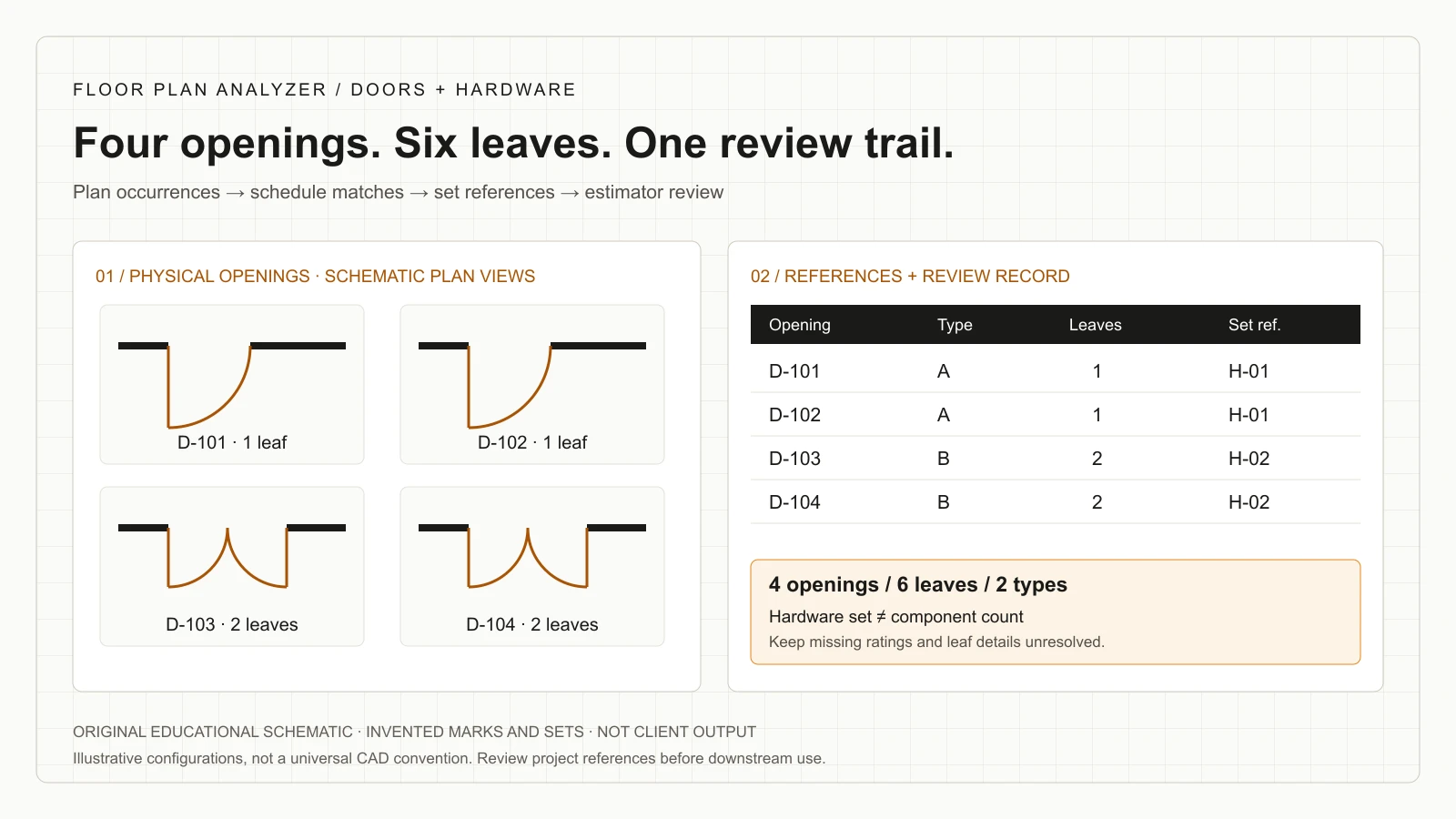
The following package is invented teaching data, not client output or a measured model result. Assume the agreed plan scope has D-101 and D-102 as single-leaf openings, and D-103 and D-104 as two-leaf pairs. The type schedule defines A for the singles and B for the pairs.
There are four physical openings and six leaves: two × one leaf plus two × two leaves. There are also two type definitions. Counting two type rows as two openings, or six leaves as six openings, produces the wrong unit for the stated task.
In this example, each opening has a hardware-set reference: H-01 for D-101 and D-102, H-02 for D-103 and D-104. That gives two opening assignments to each set. It does not establish quantities for individual hardware components; those require the approved set contents and its quantity basis.
Assume the type table states nominal assembly dimensions of 900 × 2100 mm for A and 1800 × 2100 mm for B. These invented values are not clear-opening dimensions, rough openings or individual pair-leaf widths. A pair designation alone does not establish whether the leaves are equal or which one is active.
| Physical opening | Type | Configuration | Leaves | Hardware-set reference |
|---|---|---|---|---|
| D-101 | A | Single | 1 | H-01 |
| D-102 | A | Single | 1 | H-01 |
| D-103 | B | Pair | 2 | H-02 |
| D-104 | B | Pair | 2 | H-02 |
| Roll-up | 2 types | 4 openings | 6 leaves | 4 assignments, not 4 components |
Reconcile both directions, then classify the discrepancy
A useful comparison checks plan occurrences against schedule records and schedule records against the selected plan scope. An unmatched schedule entry might be an alternate, a different level, a removed opening or a genuinely missing reference. The absence of a match is a question to classify, not proof that the document is wrong.
Keep separate issue categories for missing marks, orphan schedule rows, duplicate occurrences, conflicting dimensions, unresolved types and missing hardware references. That makes the review actionable: the estimator can see whether the problem is transcription, association, scope or a source conflict.
For an invented revision example, suppose D-104 is visible in the new plan but the supplied door schedule contains only D-101 through D-103. Record D-104 as unmatched with its plan location. Do not manufacture a row using the nearest pair, and do not drop the opening just to make the plan and schedule totals agree.
| Issue | Evidence to preserve | Review action |
|---|---|---|
| Plan occurrence without schedule match | Source crop, mark, location and candidate rows | Do not silently exclude from count |
| Schedule entry without in-scope occurrence | Row, issue and searched view scope | Check level/alternate before declaring missing |
| Repeated mark | Locations and view relationships | Decide identity before deduplication |
| Dimension disagreement | Both literal values, units and sources | Request resolution; do not average |
| Hardware-set reference missing or changed | Opening, prior/new reference and set versions | Do not substitute a convenient set |
Handing and active leaves: preserve the reference convention
Handing can be commercially important while still being unsafe to guess from an isolated arc. Preserve the schedule’s literal handing code and the manufacturer or project convention used to interpret it. If the relevant side, swing or active-leaf information is missing, leave the normalized field unresolved.
Allegion’s discussion of active-leaf notation describes multiple possible hands for pairs and the need to make the active leaf clear. For an extraction brief, record handing and active-leaf identity as separate fields rather than assuming every pair follows a familiar arrangement.
In a pilot, include mirrored views, unusual swings, unequal pairs and incomplete symbols where those occur in your workload. A model should be evaluated on whether it proposes the right association and flags uncertainty, not rewarded for filling every cell regardless of the evidence.
References: Allegion: indicating the active leaf of a pair
Ratings are documented requirements, not an AI compliance verdict
Keep rating information as literal source data first: the schedule text, its unit or wording, the opening it references, and the applicable document issue. A symbol shape, wall appearance or guessed hardware configuration should not populate a missing rating field.
UL’s application guide describes certification markings, intended uses and limitations for doors, frames and related hardware, and explains that components together form an assembly. That is a reason to keep door, frame, glazing and hardware references traceable rather than treating one schedule cell as verification of the installed assembly.
NFPA’s published swinging-door inspection checklist is explicitly based on the 2019 edition of NFPA 80. It addresses physical labels and conditions and states that it is not a tool to determine compliance. This article uses it only to distinguish document extraction from physical inspection; it does not prescribe an inspection interval or a code edition for your jurisdiction.
If a fictional row says “60 MIN,” a correct OCR result is the text 60 MIN linked to the row. It is not evidence that the product is listed for the application, that the installed opening meets a requirement, or that the design should use that rating. Route design, listing, code and inspection decisions to the appropriate project professionals.
References: UL Solutions: doors, windows and related hardware application guide · NFPA: inspection checklist, based on NFPA 80 (2019)
Keep size basis, raw text and parsed dimensions separate
A numeric width without a basis can be misused in an estimate or order. Agree which field you need: nominal door size, a leaf size, frame dimensions, rough opening or a documented clear opening. A parser should not relabel one as another simply because the downstream column is called width.
For the fictional pair in the worked example, preserve 1800 × 2100 mm as the stated nominal assembly size. Leave individual leaf widths blank until the supporting source defines them. Do not divide by two and call the resulting value an approved leaf dimension.
Also retain original fractions, feet/inches, decimal separators and units where they occur. Store a normalized value beside the raw callout and record any conversion rule. A failed parse belongs in an exception list, not in a zero-width record that might be included in a total.
Download an opening-level review template
The CSV contains the four fictional opening records above, with type, leaf count, nominal assembly size, hardware-set reference and source/review fields. Each row is marked Needs review; individual leaf widths and rating text are intentionally unresolved. It is a starting example for defining an output contract, not a fabrication order or a prescribed hardware schedule.
In a production integration, maintain separate approved type and hardware-set definitions and link them to each opening. Keep a reviewer’s change history so a corrected count or association is not lost on the next model run. Export only the release status appropriate to the receiving estimator or detailer.
Confirm how your receiving system represents empty fields, revision keys, superseded rows and quantity units. Preserve its formulas and vendor codes. Excel, a detailing platform or an internal API can consume the data when that mapping is agreed and tested.
| Field group | Suggested fields | Why it matters |
|---|---|---|
| Identity | Project, level/location, instance key, mark and type | Separate occurrence from definition |
| Geometry / dimensions | View, configuration, leaf count, raw size, parsed units and size basis | Avoid hidden unit or size assumptions |
| References | Door/frame type, hardware set and literal rating notes | Link to the supporting definitions |
| Evidence | Plan sheet, schedule row, revision and coordinates | Show the source for each conclusion |
| Review / release | Match state, issue code, reviewer, decision and release state | Separate candidates from accepted output |
References: Download the fictional door-and-hardware review template (CSV)
Treat addenda as record changes, not just a new count
Keep a snapshot of the reviewed base issue and ingest the next issue separately. Reconcile stable opening identities using the project’s naming and location rules, then classify what changed: occurrence, type, size, frame reference, hardware set, note or scope assignment.
A hardware-set change may affect the bid even when the number of openings is unchanged. Conversely, the same tag moved slightly for drafting clarity should not automatically create a new quantity. Give the reviewer old and new evidence rather than only a single net count.
Agree a controlled release process: which issue is being priced, who accepts the delta, and how superseded records are prevented from entering the new export. Reprocessing should preserve accepted decisions or explicitly ask for a new review when the source has changed.
A pilot that tests the whole estimating handoff
Choose a bounded workflow with a named reviewer and an accepted output template. Include ordinary and difficult examples, not just the clean sheets used in a demonstration. Separate training examples from held-out evaluation drawings where model tuning is part of the engagement.
Evaluate page selection, opening detection, mark transcription, schedule-cell reading, instance matching, dimension parsing and export mapping separately. Compare against reviewer-approved records. A high overall character score can still conceal a missing pair or a hardware reference assigned to the wrong opening.
Agree acceptance thresholds after understanding the sample and operational consequences. Measure review effort and exception handling as well as processing. A useful result can be a narrower automation scope that reliably assists the estimator; it does not have to be an all-or-nothing autonomous takeoff.
- Freeze the issue, scope, templates and expected quantity units.
- Define rules for openings, leaves, types and repeated views.
- Include missing marks, repeated types, pair configurations and scan problems.
- Keep source references for accepted records and discrepancies.
- Check that blanks, conflicts and rejected records behave correctly in the receiving tool.
- Record review time, corrections, unsupported inputs and the decision to expand or stop.
Evaluate value using reviewed effort and commercial fit
Measure the same finished task before and after a pilot. The baseline includes preparation, counting, schedule checking, corrections and transfer to the estimating system. The assisted workflow includes file preparation, model operation, review, resolution of exceptions and export checks.
A simple decision model is eligible packages per month × net reviewed hours saved per package × your internal loaded hourly cost. Compare that value with implementation, operating and maintenance costs over your chosen period. Use observed data; this guide supplies no promised savings percentage or price.
Custom work is a better candidate when document conventions recur, volume supports the investment and an internal owner can maintain the output rules. If the current detailing tools already provide a reliable handoff, an integration or narrow OCR enhancement may be more sensible than replacing the workflow. Evaluate options on your actual sample and review burden.
Keep changes to risk separate from proven labour savings. A discrepancy surfaced in a pilot is valuable evidence, but a hypothetical avoided construction error should not be booked as an achieved financial result.
What our delivered door-reconciliation work demonstrates
Our documented door-reconciliation project delivered a workflow for an architectural and building-envelope consultancy. It combined plan door detection, small/rotated tag OCR, schedule-table recovery and plan-to-row matching, with a structured JSON matrix and an annotated discrepancy PDF.
The case is labelled Delivered pipeline. Its stated boundary is that the system flags candidates while the consultancy’s reviewers decide how conflicts are resolved. It does not establish a universal door-and-hardware estimating product or certify rating compliance. The image on that case is our output on a comparable sheet; client drawings are confidential.
For a contractor engagement, the relevant next step is to scope the additional fields, set references and estimating integration your team needs. We fine-tune our models on your drawings and engineer the software around those requirements; the delivered case is evidence of related work, not a substitute for your pilot.
References: Delivered project: door tags reconciled to schedules
Send a door schedule and the output you want
For a useful feasibility discussion, provide a plan sheet with door marks, the matching door schedule, relevant hardware-set definitions and an example of your accepted estimating record. Include the issue/revision, quantity units and any recurring discrepancy your team spends time resolving.
Name the person who reviews the output and clarify whether the first goal is opening counts, schedule transcription, reconciliation or an integration into your existing detailing system. That lets us propose a bounded pilot and identify what needs annotation, another source document or human interpretation.
Leave your work email above to arrange how to share the sample, or use the one-sheet analysis form below when ready. An email alone does not submit a drawing. Floor Plan Analyzer is AxcelerateAI’s drawing-intelligence practice: custom model tuning and software built around your workflow.
Frequently asked questions
Does AI count openings or door leaves?
It should report the quantity definition you agree. In our invented example, two singles and two pairs are four openings and six leaves. Keep separate fields so the downstream estimate uses the correct unit.
Can AI match door tags to schedule rows?
A pipeline can propose those matches using text, locations and view relationships, and flag missing or conflicting records. The receiving reviewer decides how project discrepancies are resolved.
Can it produce a complete hardware bill from a door count?
A count alone cannot supply the bill. Component quantities require the approved hardware-set definitions, quantity bases, opening attributes and detailing rules. A set identifier is not a universal product list.
Can a swing arc establish handing and the active leaf?
Do not assume an isolated arc contains all the necessary information. Preserve the project/manufacturer convention, literal handing code and active-leaf reference; flag missing evidence.
Does a rating in the door schedule prove compliance?
No. Extraction can preserve documented rating text and its source. Product certification, assembly compatibility, design requirements and installed-condition inspection are different checks handled through the appropriate project process.
Can the workflow handle scanned schedules?
OCR and table recovery can be evaluated and tuned on representative scans. Tiny text, merged cells, low contrast and incomplete source information need an exception process; support is not assumed from a clean example.
Can we keep our estimating or detailing software?
Yes. A custom engagement can target its existing columns and exchange format. Agree identifiers, units, formulas, blank values, review states and revision behavior before implementing the mapping.
What should a pilot measure?
Measure missed/extra openings, leaf-count errors, tag and cell transcription, incorrect matches, dimension parsing and export validity, plus total review and correction effort. Set acceptance thresholds using your sample rather than an unsupported universal percentage.
References and illustration notes
Sources support the terminology and interpretation notes cited above. Worked examples and diagrams are our own educational material, not client drawings or measured project results.