AI Drywall Takeoff: Wall Lengths, Layers & Areas
By Floor Plan Analyzer, an AxcelerateAI practice
AI drywall takeoff should give an estimator quantities they can trace, check and price. Finding a wall on a plan is the start: its height, lining on each side, layer count and opening treatment decide how much board belongs in the estimate.
This guide explains the workflow from multi-page drawings to reviewed wall records. A three-run worked example, an editable CSV and a pilot checklist show where automation can help and where a source document or estimator decision is still needed.
What can AI do for drywall takeoff?
A custom pipeline can shortlist relevant sheets, trace wall runs, read partition tags, propose links to heights and build-ups, and calculate supported lining quantities for review. Keep physical length, exposed face area, layered board area and procurement quantities separate. Missing heights, unresolved types and conflicting details belong in an exception queue.
- Measure each physical wall once, then define the lining on each face.
- Calculate accepted areas from explicit height, layer and opening rules.
- Keep source evidence, unknowns and review status with every exported quantity.
What should an AI drywall takeoff actually deliver?
For an estimator, the useful output is a reviewable register of wall segments and the lining assigned to each face. A line length is only one input. The priced scope also depends on height, board product, layers, openings, finishing and the relationship between plans, wall types and details.
Use AI to propose geometry, read tags and connect the source documents. Use explicit calculation rules to turn accepted records into quantities. Keep the commercial decisions visible: what is included, how deductions are treated, which issue is being priced and who releases the export.
Drywall, plasterboard and gypsum board are common search terms for related work, but they do not define the same product specification or measurement convention on every project. Preserve the project’s own material names, units and scope rather than replacing them with a generic assembly.
| Quantity | Meaning | Do not confuse it with |
|---|---|---|
| Wall-run length | Agreed line measurement in m or ft | Room perimeter counted independently on both sides |
| Face area | Surface area for one specified side | Floor area or board area including hidden layers |
| Layered board area | Each specified lining layer counted by product | Only the exposed finished surface |
| Purchase quantity | Panel sizes, layout, pack rounding and allowances | A direct area conversion with no cutting plan |
Start with a sample package that defines the work
Ask for the current floor plans, partition-type schedule, wall sections, relevant specifications and elevations, plus reflected ceiling plans when soffits or ceiling interfaces are in scope. Request addenda and an issue register. The estimating template is just as important: it defines the units, groupings and cost codes the extracted data must serve.
Agree the boundary before measuring. A drywall package might include board only, or also framing, insulation, finishing, trims and ceilings. Record exclusions such as exterior sheathing, existing walls, demolition, temporary partitions or work by another trade. None should disappear into an undocumented default.
A useful first sample includes at least one ordinary wall type and one difficult condition your estimators encounter. Supply an accepted manual takeoff for comparison where available. Use an approved transfer route for confidential drawings and share only material you are authorised to provide.
- Freeze the drawing issue and included levels, zones and alternates.
- Identify the length basis: centreline, face, or another stated project rule.
- Name the source for wall heights and side-specific build-ups.
- State the opening-deduction rule, return treatment and allowance policy.
- Provide the receiving spreadsheet or estimating-system field definitions.
Select the right pages before tracing a wall
A multi-page set should first become a document register. Read sheet numbers, titles, revisions and view labels; classify plans, partition schedules, sections, elevations and details. OCR belongs in this document-understanding step as well as in tag extraction.
Link a partition tag to its actual definition and the applicable detail. The relevant height might be on a section while the lining varies by room side. If a plan and enlargement show the same wall, retain their relationship so the pipeline does not create two measured instances.
The selection should be inspectable. List included pages and reasons for exclusions, and flag missing schedule pages or unreadable tags. A polished overlay on the wrong issue is not an accepted takeoff.
Calibrate each view and define how length is measured
Keep the measured path, source view, units and scale evidence with every wall run. Check the calibrated geometry against a known dimension before accepting lengths. If a scan is stretched or a PDF has been resized, treat inconsistent checks as an exception rather than assuming the printed scale is sufficient.
Bluebeam’s viewport documentation explicitly supports regions with a different measurement scale from the rest of a PDF. The same practical requirement applies to an automated pipeline: an enlarged detail on a sheet should not inherit the floor plan’s scale without verification.
Agree how junctions and endpoints are measured. Tracing both visible wall edges and then summing both as separate partitions can double the physical length. Likewise, a shared partition appears in two room perimeters but remains one physical wall with separately specified faces. Curves, angled runs and offsets need their actual geometry, not a bounding-box shortcut.
References: Bluebeam: view-specific measurement scales
Read wall types, heights and layers as separate evidence
A type tag is a pointer to a definition, not a material quantity. Preserve the literal tag and its schedule/detail source, then store the specification for face A and face B independently. Do not assume equal products or layer counts on both sides.
For height, distinguish a visible ceiling level from the documented extent of the lining or partition. Where the source describes continuation above a ceiling, partial-height board or a sloping top, retain that condition explicitly. Split a run where its accepted height or build-up changes. Unknown heights should remain unresolved, not become a zero or a building-wide default.
National Gypsum’s assembly guidance includes configurations with different layer arrangements on opposite sides. This is a concrete reason to keep side-specific records. A wall thickness or tag alone is not evidence that an assembly satisfies a fire or acoustic requirement; preserve its specified reference and have the appropriate project reviewer resolve selection and compliance.
References: National Gypsum: assembly-specific configurations
Calculate face area first, then expand the required layers
For a rectangular face at constant height, gross face area = accepted run length × accepted lining height. Net face area = gross face area − the opening area deductible under the agreed rule. Board area for a product is the sum of the applicable net face areas across the layers that use that product.
If the two faces share the same geometry and deductions, a compact expression is net face area × (layers on face A + layers on face B). It is only valid when those assumptions are true. If face heights, opening treatments or products differ, calculate them separately and keep separate product totals.
For a sloping rectangular-to-trapezoidal face with a straight top, length × average endpoint height can describe that specific geometry. Stepped, curved or otherwise irregular faces need segmentation or polygon areas. Do not silently apply the rectangular formula to every wall.
Keep length, area and units explicit. One metre of wall is not one square metre of board; one square foot is not one square metre. Apply unit conversion once in the agreed stage and retain the original measurements beside the normalized values.
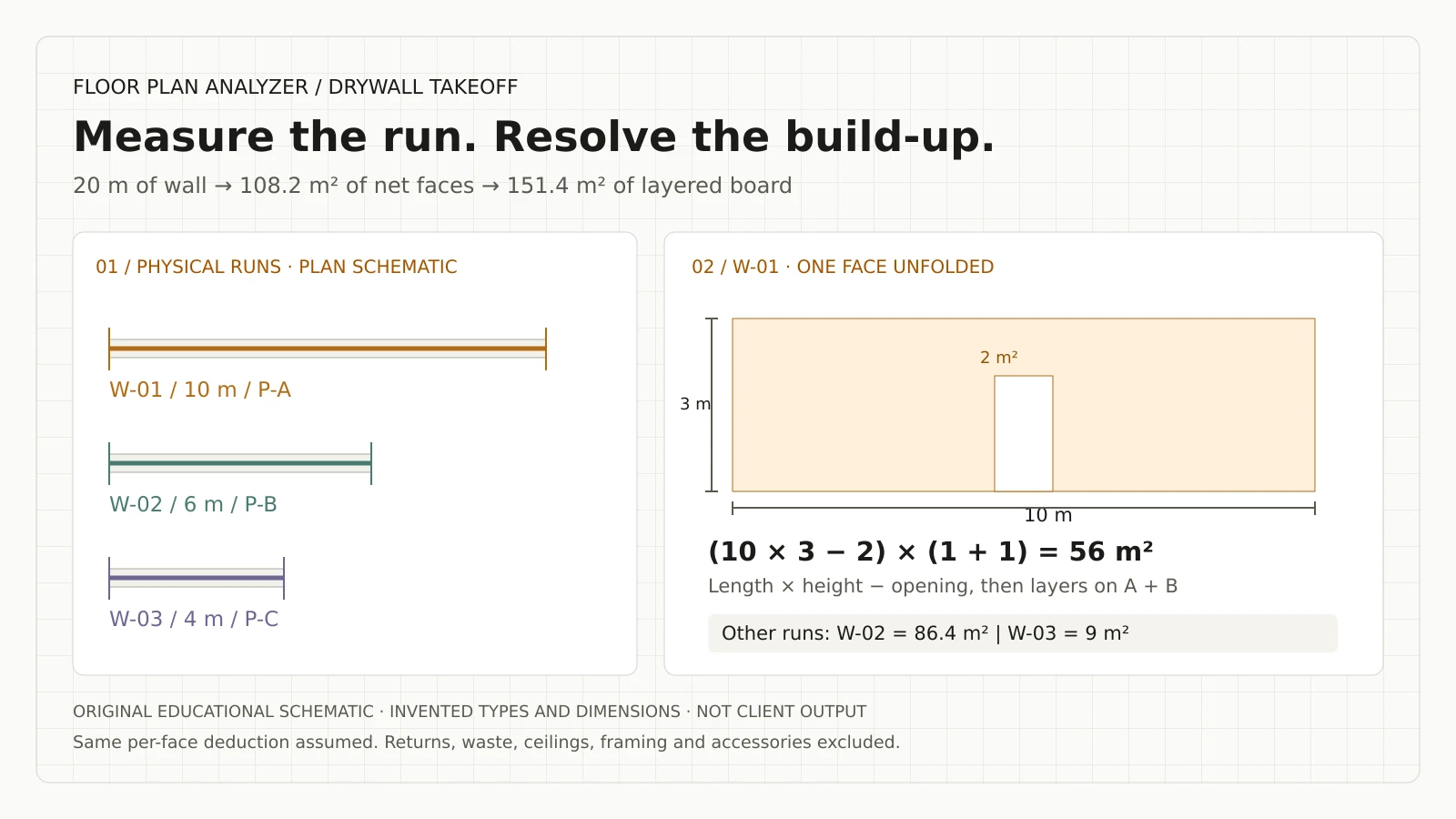
Worked example: 20 metres of wall, 151.4 square metres of board
These are invented teaching records, not a client drawing or an AI benchmark. Assume three separate rectangular wall runs with accepted heights and identical opening deductions on each included face. Length is measured continuously through the openings; the deduction is applied in the area calculation only.
W-01 is 10 m long and 3 m high, with one layer on each of two faces. Its fictional deduction is 2 m² per face: (10 × 3 − 2) × (1 + 1) = 56 m² of board. W-02 is 6 m long and 3.6 m high, with two layers on each face and no openings: 6 × 3.6 × (2 + 2) = 86.4 m².
W-03 is 4 m long and 2.7 m high, with one included face and a 1.8 m² deduction: (4 × 2.7 − 1.8) × 1 = 9 m². Its other face is explicitly excluded from this example. Adding another face later would be a scope change, not a rounding adjustment.
Total physical run length is 20 m. Net face area across included sides is 56 + 43.2 + 9 = 108.2 m², while layered board area is 56 + 86.4 + 9 = 151.4 m². The extra hidden layers on W-02 explain the difference. Neither total includes returns, waste, ceilings, framing or accessories.
| Run / fictional type | Length × height | A / B layers | Deduction per face | Layered board area |
|---|---|---|---|---|
| W-01 / P-A | 10 × 3 m | 1 / 1 | 2 m² | 56 m² |
| W-02 / P-B | 6 × 3.6 m | 2 / 2 | 0 m² | 86.4 m² |
| W-03 / P-C | 4 × 2.7 m | 1 / 0 | 1.8 m² | 9 m² |
| Total | 20 m run length | Side-specific | Per-face basis | 151.4 m² |
Deduct openings once and measure returns separately
Define whether each exported length continues through openings. If the measured run already excludes a door gap, subtracting that door area again can double the deduction. Conversely, a continuous baseline can support an explicit opening register with width, height, host wall and the faces or layers affected.
An opening-deduction policy is a project or estimating decision. Record it instead of assuming that every penetration is deducted or that a universal minimum size applies. Keep geometric opening area, accepted deductible area and the reason for any difference as separate fields. Resolve overlapping openings before subtracting their areas.
Jamb, head and sill returns can require lining even when the main face has a deduction. If included, measure their documented dimensions and product/layer requirements as separate return records. For a simple rectangular opening, a proposed three-sided return expression is (2 × opening height + opening width) × return depth, but only where the detail actually calls for those two jambs and head; it does not automatically include a sill.
Never infer return depth from a schematic wall thickness or duplicate the return against every face. Unspecified returns belong in the review queue. The sample CSV excludes them deliberately so the 151.4 m² total remains reproducible.
Keep finish, framing, ceilings and accessories in their own quantities
Finishing area should not automatically equal layered board area. Hidden board layers increase material coverage but do not create the same exposed decorative surface. Retain the specified finish and its location alongside the relevant exposed faces; do not label the entire board total as a finishing quantity.
The Gypsum Association publishes GA-214 guidance for levels of finish. Its catalog lists multiple editions, including 2026. Capture the edition and finish requirements named in the project documents; this takeoff workflow does not select a finish level from room appearance or prescribe an edition for a contract.
Framing, insulation, track, trims, sealant and fasteners need their own approved quantity rules. A simple length divided by stud spacing can omit ends, corners, openings, junctions and special support conditions. Similarly, tape and compound usage depend on the chosen system and method, not a universal multiplier attached to every square metre.
Treat ceilings, bulkheads, soffits and drops as separate geometry and scope. A room’s floor area is not a complete lining takeoff for those surfaces. Preserve the relationship to the reflected ceiling plan and details rather than extending a wall-only model’s claims.
References: Gypsum Association: installing and finishing publications
Convert accepted coverage into procurement deliberately
An area divided by panel area gives a coverage equivalent, not a cutting layout. In the fictional W-01 example, assume one uniform product and a 1.2 × 2.4 m panel solely to illustrate the arithmetic: 56 ÷ 2.88 = about 19.44 panel areas, rounded to 20 for area-only coverage. That is not an order recommendation.
Actual ordering still needs the selected panel dimensions, orientation, permitted joints, cut reuse, installation constraints, product separation, packs and estimator-approved allowances. Do not pool different board products or layer specifications just to make the rounding look efficient. An opening deduction in the estimate does not prove that the removed material is reusable on site.
USG’s wallboard estimator states that its estimates exclude a waste allowance and depend on the installation practices used. Keep the same distinction in a custom export: raw measured quantities, accepted coverage, and the separately approved ordering allowance. There is no justified universal waste percentage in this guide.
Leave pricing and labour rates in the estimator’s controlled system unless a separate integration is commissioned. Record whether a quantity includes allowances so an imported spreadsheet does not apply them a second time.
References: USG Sheetrock wallboard estimator: scope and waste note
Download the wall-run review template
The downloadable CSV contains the three fictional records above, including length, height, per-face opening deduction, face-specific layers, net face area and layered board area. Every row is marked Needs review and carries source/revision fields. Type names are teaching labels, not approved assemblies or product specifications.
It is an example of an output contract, not a fabrication order. A production schema should also carry side-specific products, raw tag text, scale checks, opening IDs, confidence or issue codes, evidence locations and reviewer decisions. Preserve blanks as unknowns where appropriate; do not convert them into zero quantities.
Agree field names, units, rounding, formulas and cost-code mappings with the receiving estimator. CSV can carry the records; an Excel or API integration can preserve the review and calculation rules around them. The reviewer should be able to get from a disputed total to the individual run and its source without remeasuring the set.
| Record group | Example fields | Purpose |
|---|---|---|
| Identity and scope | run_id, level, type, side, issue | Avoid duplicated views or omitted alternates |
| Evidence | sheet, view, coordinates, type/height source | Make the interpretation inspectable |
| Calculation | length basis, height, openings, layers, units | Reproduce accepted area |
| Review and release | issue code, decision, reviewer, export state | Prevent unaccepted guesses reaching pricing |
References: Download the fictional drywall takeoff review template (CSV)
Use an exception queue instead of filling every field
A practical pipeline combines document understanding, geometry, detection, OCR, association and deterministic calculations. Each stage should be able to stop a record from automatic release. A missing height is a different issue from an uncalibrated view or a correctly read tag that has no supplied definition.
Provide source crops or coordinates and both values when documents conflict. If a type schedule and a section imply different build-ups, keep the discrepancy visible and assign it to the project’s reviewer. The model should not silently decide which drawing outranks another.
Difficult conditions worth including in a sample are low-contrast scans, dense dimension strings, broken wall lines, curved partitions, repeated type tags, above-ceiling changes, demolition overlays and incomplete addenda. Training and tuning can address repeatable document patterns; absent design information still requires a source or a decision.
| Exception | What to preserve | Release condition |
|---|---|---|
| Unverified scale | Known dimension and proposed calibration | Accepted geometry check |
| Missing / conflicting height | Plan note and section references | Reviewer accepts a source and extent |
| Unknown type or side layers | Literal tag, candidate definition, face | Build-up resolved |
| Duplicate view / scope ambiguity | Both occurrences and level/alternate | Physical instance agreed |
| Opening or return unresolved | Host run, dimensions, deduction policy | Accepted treatment recorded |
Handle revisions as changes to accepted records
Keep the reviewed base issue and the new issue as separate snapshots. Match wall identities using location, geometry and the project’s references, then classify changes in run length, height, type, openings, layer counts and scope. A new file with the same sheet number must not overwrite an accepted decision without a trace.
A type change can alter board coverage while wall length remains identical. A moved tag can leave the assembly unchanged. Give the estimator old and new evidence and a quantity delta by product and location, not just a colour overlay or a single net total.
Agree how approved corrections survive reprocessing, when a source change forces re-review and how superseded rows are excluded from the export. Revision control is part of the takeoff handoff, not a separate feature added after the quantities are priced.
Evaluate a pilot on the completed estimating task
Choose a bounded package and a named estimator. Agree scope, measurement conventions and accepted output before tuning. Separate training examples from held-out evaluation sets and include representative difficult conditions rather than only clean demonstration sheets.
Measure geometry, tag reading, type association, height assignment, layer interpretation, opening deductions and export validity separately. Compare accepted per-run records as well as totals: an omitted wall and a duplicated wall can cancel in a grand total while leaving the estimate wrong.
Time the entire assisted workflow, including preparation, corrections, exception resolution and transfer to estimating. Compare it with the same completed manual task. Use the team’s observed hours, eligible monthly volume, internal cost and implementation/operating costs to evaluate value; this guide promises no savings percentage or accuracy figure.
A simpler tool or an integration with existing takeoff software may be sufficient when manual review already works well. Custom engineering is worth scoping when recurring drawing patterns and output requirements justify a maintained pipeline, with an owner for review and change control.
- Test held-out drawings at the actual scan quality and sheet mix.
- Report missing and extra runs, not only aggregate length error.
- Check side-specific layers, unknowns, revisions and opening policy.
- Reconcile CSV/Excel values against the approved calculation rules.
- Set acceptance thresholds and a stop/expand decision using your sample.
What our delivered estimating work demonstrates
Our published commercial-estimator project describes a Delivered pipeline for counts and wall runs across multi-page sets, with scale checks and export into the team’s existing Excel template. Each figure carried its sheet and measured location.
That is related engineering evidence, not a claim that every drywall assembly, finish or procurement rule has already been automated. The project page’s wall image is our own output on a comparable sheet; client drawings remain confidential. Review remained part of the workflow.
For a drywall engagement, we would scope the additional wall-type links, height sources, face/layer definitions, opening policy and estimating integration around your documents. Floor Plan Analyzer is AxcelerateAI’s drawing-intelligence practice. We fine-tune our models on your drawings and engineer the software around the accepted handoff.
References: Delivered project: takeoff for a commercial estimator
Send a drywall plan and the estimate you want to produce
For a useful feasibility discussion, prepare a current plan, matching partition schedule and height details, plus an example of the spreadsheet your estimator accepts. State whether you need wall lengths, lining areas, opening reconciliation, a material breakdown or an integration with the current system.
Include known difficult conditions and the review rules that matter commercially. We can then identify a bounded pilot, the evidence needed for unresolved fields and what tuning or annotation would be required. A sample sheet can establish a starting point; a complete contractual takeoff requires its agreed scope and sources.
Use the work-email form above to arrange how to share that package, or the one-sheet analysis form below when ready. Leaving an email alone does not submit or analyse a drawing.
Frequently asked questions
Can AI calculate drywall quantities from a floor plan alone?
It can propose wall geometry and read available tags, but a complete lining takeoff also needs accepted heights, side-specific build-ups, openings and scope. Missing definitions must be supplied or reviewed rather than guessed.
Is wall length the same as drywall area?
No. A constant-height rectangular face uses length × lining height, then the agreed opening deductions. Board area additionally counts the required layers on each included face.
Should I count both sides of every wall?
Only where both sides are in the agreed scope, with the specified layers and products for each. Do not double a shared wall’s physical length merely because it belongs to two rooms.
Do door and window openings always get deducted?
The export should follow the accepted measurement policy. Keep the measured length basis, opening area and accepted deduction explicit to avoid deducting a gap twice. Returns are separate if specified.
Can a plan show the correct wall height?
Sometimes, but relevant heights and extents can be in sections, elevations, details or notes. A ceiling level alone does not establish the lining extent. Flag absent or conflicting sources.
Does layered board area equal finishing area?
No. Additional hidden layers increase board coverage without creating the same exposed decorative surface. Track the specified finish and exposed area separately.
Can I order panels by dividing area by panel size?
That gives an area-only coverage equivalent. Ordering also needs product separation, layout, cuts, joints, reuse, pack rounding and an approved allowance. The guide’s example is not an order recommendation.
Does the system verify fire or acoustic compliance?
This workflow extracts documented references and quantities. It does not select or certify an assembly. Appropriate project professionals resolve design, listing and compliance requirements.
Can we retain our Excel takeoff template?
Yes. A custom engagement can map accepted records into the current template or API. Agree units, formulas, grouping, allowances and review status before implementing the transfer.
References and illustration notes
Sources support the terminology and interpretation notes cited above. Worked examples and diagrams are our own educational material, not client drawings or measured project results.