AI Plan Review for Architects: Cross-Sheet Checks
By Floor Plan Analyzer, an AxcelerateAI practice
A useful AI drawing check should show exactly which observations disagree, on which issues and under which rule. The architect needs evidence to investigate, not an unexplained score saying a set is coordinated.
This guide explains the source-to-review workflow and includes an original plan/schedule example, machine-readable fixture and editable issue register.
What can AI plan review do for architects?
A custom pipeline can identify relevant views, read tags and schedule fields, propose contextual matches and flag discrepancies under explicit rules. Each candidate should cite its source issues and regions, preserve unknowns and go to a reviewer. Cross-sheet consistency checking does not by itself establish design adequacy, clash freedom or code compliance.
- Compare the same issue, scope and field meaning before flagging a difference.
- Distinguish contradiction, missing match and not-evaluated states.
- Keep source evidence, rule versions and reviewer decisions with each finding.
Download the fictional review inputs and expected findings JSON
Define the review question before running the set
A useful drawing review starts with a checkable question: does each in-scope door reference have the intended schedule record, and do comparable fields agree? A long narrative saying that the drawings appear coordinated does not show what was checked, which sources were used or what remains unknown.
Choose the deliverable and review boundary first. A pre-issue consistency check, an internal QA pass and a consultant-coordination review involve different document sets and owners. Define the drawing issue, building, level, phase, option and packages that belong in the run. Keep excluded or unprocessed content visible.
Floor Plan Analyzer is AxcelerateAI’s drawing-intelligence practice. We fine-tune models on your drawing conventions and engineer source selection, OCR, matching, rule checks and review outputs around your workflow. This guide describes a custom engineering scope, not an automated design approval or an off-the-shelf permit decision.
Separate consistency, geometry clashes and compliance
A tag-to-schedule comparison asks whether two representations of an item agree. A geometric clash check asks whether supported geometry conflicts in space. Compliance review asks whether an applicable requirement is satisfied under a defined design and jurisdiction. These are different questions and should have different evidence and release criteria.
Consistent documents can repeat the same wrong value. A missing schedule match can also be caused by the selected view coverage, a grouping convention or failed OCR. A contradiction is a candidate for investigation, not proof that the plan is correct and the schedule is wrong.
| Review layer | Example question | Boundary |
|---|---|---|
| Document consistency | Does an in-scope mark map to a schedule record? | Does not establish design adequacy |
| Comparable field check | Do two leaf-width values agree after unit normalization? | Requires the same field meaning |
| Geometric coordination | Do supported model elements intersect? | A 2D symbol alone is not a full 3D model |
| Compliance/design decision | Does the actual design meet the relevant requirement? | Needs applicable rules, complete evidence and responsible review |
Build a source register and a comparison baseline
Keep drawing number, revision, PDF page, view and discipline as separate fields. Record what the project team identifies as current, superseded, missing or disputed. A plan from one issue and a schedule from another can produce a technically correct comparison of the wrong baseline.
Treat package completeness as an input to each check. A schedule-only mark is meaningful only in relation to the plan views and exclusions actually reviewed. If a missing level was never supplied, report the limitation rather than declaring that its scheduled doors do not exist.
Preserve the file identity and issue used for each result. When a document is replaced, create a new comparison run rather than quietly changing the evidence behind an existing issue. This is especially useful when an architect is answering a question about a previously issued package.
Make identity depend on context, not the tag string alone
Use a composite matching policy appropriate to the set: project, building, level, phase or option, category and the relevant identifier. The same printed mark can occur legitimately in separate buildings, and a family type may repeat across many instances. A global text join can merge unrelated records.
Autodesk’s Revit 2022 door-properties documentation describes Mark as an instance identifier and notes that a duplicate value produces a warning but can still be retained. That is a useful reason to check uniqueness under the project’s conventions rather than assume that every exported mark must be globally unique.
Keep candidate matches and their reasons. An exact contextual match, an alias accepted by a reviewer and an unresolved fuzzy suggestion should not become the same status. Preserve the original identifiers so a reviewer can reconstruct why two observations were joined.
References: Autodesk Revit 2022: door instance properties and Mark behavior
Write rules that explain the evidence needed to run
Each rule needs an ID, version, applicable scope, required inputs, normalization and an outcome policy. State whether it tests presence, equality, permitted values, a reference target or a spatial relationship. Record not evaluated separately from no discrepancy found.
A width check requires comparable fields. Leaf width, clear opening and rough opening can legitimately differ. Normalize supported units before comparing, but do not convert an undefined column into a guessed property. Tolerance and rounding must follow the agreed check; pixel measurement is not a substitute for a documented dimension.
For detail references, verify the referenced sheet and view identities against the supplied register, and distinguish a broken reference from a missing source package. For room finishes, compare explicit assignments under a defined room-ID policy rather than treating a room name as a complete finish specification.
Worked example: three candidate issues with different meanings
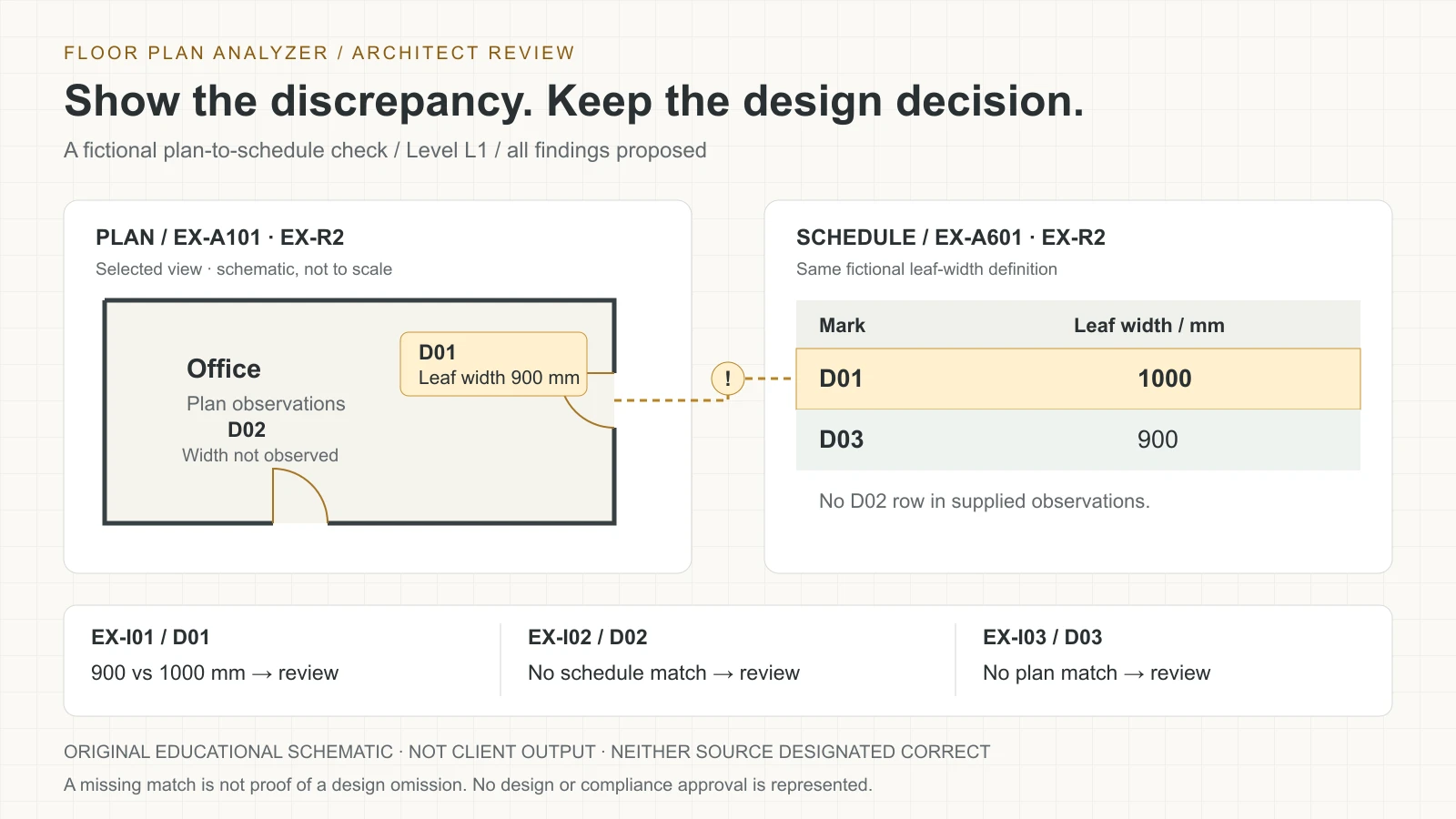
The original illustration and downloads use a fictional Level L1 comparison. Plan EX-A101 revision EX-R2 contains D01 with an explicit leaf-width observation of 900 mm, and D02 with no width observation. Schedule EX-A601 revision EX-R2 contains D01 at 1000 mm and D03 at 900 mm. Both use the same fictional leaf-width definition.
An exact contextual join produces one matched mark, D01. Its supported widths differ by 100 mm. D02 has no schedule match in the supplied example. D03 has no plan match in the selected plan observations. Those are three different review questions, not three proven design errors.
The example has no authority rule deciding which value is right. Both one-sided findings retain a coverage limitation, and D02’s width remains unknown. Every finding is Proposed with no reviewer decision or release approval. The fixtures are educational data, not results measured on a customer set.
| Candidate issue | Observed evidence | Next review question |
|---|---|---|
| EX-I01 / D01 | Plan leaf width 900 mm; schedule 1000 mm | Are the observations comparable and which source needs correction? |
| EX-I02 / D02 | Plan observation; no matching supplied schedule row | Is the schedule complete and is the identifier interpreted correctly? |
| EX-I03 / D03 | Schedule row; no matching selected plan observation | Is the relevant view in scope, or was a tag missed? |
References: Download the fictional architect-review issue register CSV
Keep document revision conflicts out of the discrepancy queue
A rule should first confirm that its inputs belong to the intended comparison baseline. If one source is superseded, issue a source-selection exception and hold the check. Do not flood the architect’s queue with differences created solely by mixing old and new documents.
Across review runs, preserve the identity of an issue where possible, with old and new evidence. Distinguish unchanged, changed, resolved-by-review and no-longer-evaluable. If OCR stops reading a previously flagged tag, that does not establish that the design team resolved it.
Require a reason to close a finding: source correction verified, accepted design condition, duplicate issue, extraction error or another agreed disposition. A new upload can propose a changed state, but closure should follow the project’s reviewed workflow.
Give the architect a compact evidence package
Every finding should name the check, affected item, both document issues and the relevant regions or rows. Show raw observations and normalized values with units. Explain the contradiction in one sentence, then ask a specific question. The reviewer should not have to search a hundred-page set to discover what the software compared.
Keep severity separate from extraction confidence. Severity concerns the potential consequence under the project’s own criteria; confidence concerns uncertainty in a proposed observation or match. A clear OCR result can still be an unimportant difference, while a missing high-consequence source needs urgent review.
Assign ownership without pretending the system can authorize design changes. Architects and consultants can accept, reject, amend, defer or request clarification. Preserve comments, supporting evidence and disposition history. Notify the relevant team only through the communication process agreed for the engagement.
Choose PDF review, model checks and issue exchange deliberately
If reliable source model data is available, evaluate which checks can use it directly rather than re-reading a PDF. If the deliverable is a published drawing set, preserve the distinction between the model information and what is actually visible in that issue. Select the least ambiguous source for each question.
buildingSMART describes IDS as a computer-interpretable XML standard for IFC-based information delivery specifications. It can support a model-information requirement workflow; that does not turn arbitrary scanned PDF tags into valid IFC properties or make a cross-sheet OCR check an IDS validation.
BCF 3.0 documentation defines exchange of topics such as issues, with associated markup and optional viewpoints or snapshots. BCF is an issue-exchange choice, not the checking logic or a design approval. A simple CSV may be enough for a first workflow; a real integration needs agreed identifiers, fields and receiving-system behavior.
| Available evidence / task | Possible approach | Verify before commitment |
|---|---|---|
| Issued PDF plan and schedule | OCR, contextual matching and rule checks | Issue identity, field meaning, source regions |
| IFC information requirement | Model-based requirement checking, potentially IDS | Required properties, schema/version and checker scope |
| BIM-linked issue handoff | BCF topic exchange | Version, model identity, viewpoints and import behavior |
| Review spreadsheet | Stable issue register with source links | Ownership, disposition and revision history |
References: buildingSMART: BCF-XML 3.0 technical documentation · buildingSMART: Information Delivery Specification scope
Test issue imports and preserve a useful fallback
A file extension does not prove that an issue will land on the intended model element. Autodesk’s BCF troubleshooting documentation identifies model/GUID association and missing viewpoints or topic data as possible import problems. Check the receiving application’s supported version and fields with representative issues rather than promising universal interoperability.
In a pilot, round-trip one issue with its title, source references, identifier, comments and status. Verify the view or model association in the receiving system, then test an update without creating a duplicate. Keep a readable evidence export if a model link cannot be maintained.
The downloads here are a custom JSON input/expected-finding example and a CSV register. They are not BCF files, an IDS specification or a verified connector. Any BCF, issue-platform or authoring-tool integration is separately scoped and tested.
References: Autodesk: BCF issue import/export troubleshooting
Evaluate detection, matching and review value separately
Use an independently annotated set of expected checks and candidate findings, including intentionally clean cases. Hold out drawing families or projects from tuning when testing generalization. Include small tags, repeated types, mixed issues, poor scans, missing pages and unit differences rather than selecting only clear demonstrations.
Measure missed candidate issues, unsupported findings, wrong identity matches and field-level extraction errors separately. Include unevaluated checks and coverage in the report. A low finding count may mean a clean set, a narrow rule library or a pipeline that failed to read half the schedules.
If the aim is to reduce checking effort, compare the complete review process under the same scope: preparation, extraction, triage, corrections and export. No measured accuracy, time saving, RFI reduction or project outcome is claimed by this example. Agree acceptance thresholds with the responsible team.
| Test scenario | Expected behavior | Unacceptable shortcut |
|---|---|---|
| Unclear D0I/D01 text | Ambiguous observation; reviewer confirmation | Silently force a match |
| Old plan/new schedule | Source-selection exception | Call every change a design error |
| Clear-opening/leaf-width columns | Field mismatch; do not compare as equals | Flag all numeric differences |
| Missing level drawing | Coverage exception | Declare scheduled items nonexistent |
| Tag disappears in a new scan | Not evaluable or investigate | Automatically close prior finding |
Protect confidential sets and define release ownership
Agree authorized document access, processing location, retention, deletion and model-training permission before sample transfer. Access to a drawing for review is not automatically permission to train a model on it or publish a crop. Keep externally shared examples separate from customer source evidence.
Version the extraction model, matching policy, rule library and source register used for each review run. Assign who can edit a rule, override a match, close a finding and issue a final report. Preserve an audit trail for changes without silently overwriting a previously reviewed record.
Broader design, safety and code questions require their own complete evidence and qualified review. A document consistency tool can help organize candidate concerns, but a green comparison result does not certify the building, the drawing set or the professional service.
Scope a discovery conversation around one review loop
Start with one check family and a representative authorized set: door tags to schedules, room IDs to finish schedules or detail references to the drawing register. Bring the actual review checklist and a few manually checked examples, including false alarms and unresolved cases.
Agree the source boundary, field definitions, exception policy, output register and reviewer handoff before adding more rules. A useful initial deliverable is a traceable findings package and an evaluation against your team’s reference, followed by an integration decision based on what was learned.
Our existing door-schedule reconciliation project page describes a delivered pipeline and preserves its limits: reviewers made the decisions. It is related engineering evidence, not proof that every check in this guide has already been delivered. Leave your work email above to discuss your own scope and arrange secure sample sharing during follow-up.
Frequently asked questions
Does AI approve an architectural drawing set?
This workflow produces reviewable consistency findings. Architects and the responsible project team interpret the evidence and control design decisions and issue approval.
Is a schedule-only mark proof of a missing door?
No. It means there is no match in the selected observations. Check drawing coverage, scope, grouping conventions and extraction before deciding what needs correction.
Can it compare any two width columns?
Only when the fields have comparable meaning and supported units. Leaf width, clear opening and rough opening are different concepts; do not treat every numeric difference as an error.
Can a clear comparison certify code compliance?
No. Consistent documents can repeat the same wrong information, and compliance requires an applicable requirement, complete design evidence and responsible review.
Do the downloads implement BCF or IDS?
No. They are custom fictional JSON and CSV teaching artifacts. Model-based checking and standards-based issue exchange require separately scoped formats and integration tests.
How do we know the checker is useful?
Test coverage, field extraction, matching and candidate findings against independent reviewed examples. Include clean and difficult cases, then measure the full review effort under the same scope.
References and illustration notes
Sources support the terminology and interpretation notes cited above. Worked examples and diagrams are our own educational material, not client drawings or measured project results.