Window Symbols on Floor Plans: A Visual Reading Guide
By Floor Plan Analyzer, an AxcelerateAI practice
Window symbols on floor plans locate glazing in walls, but the symbol alone may not tell you how the window opens, how high it is, or how its assembly should be counted. A reliable reading combines the plan with its tag, schedule, elevation and details.
This visual guide compares 12 window and glazing examples, explains which view resolves each question, and works through an opening-count and area example. It is written for people reading, estimating from, or extracting data from drawing sets. The project legend and referenced documents govern the actual set.
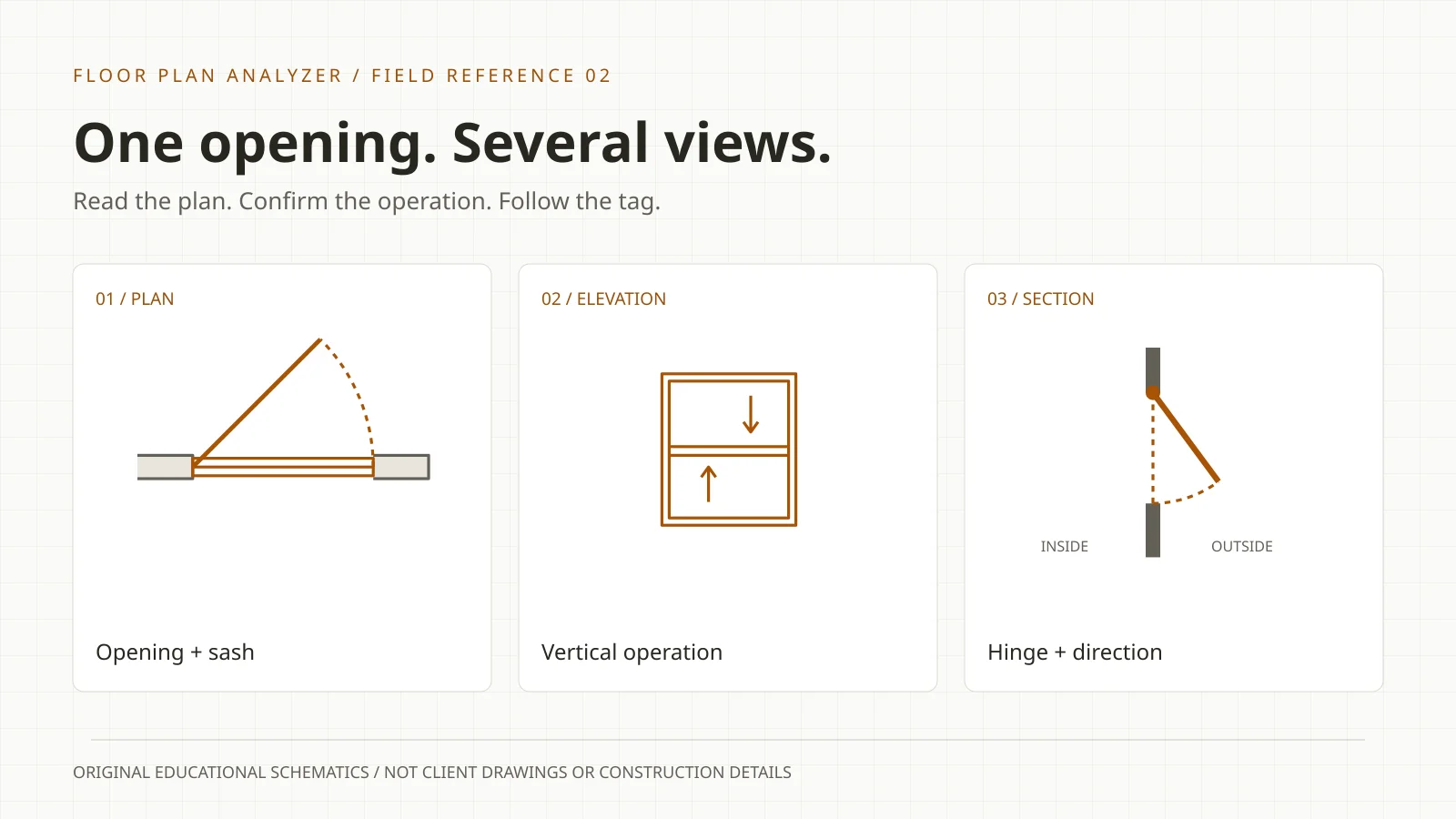
What does a window symbol look like on a floor plan?
A window is commonly drawn as thin glazing and frame lines within a wall opening. An operating sash may add a sweep or travel cue, while a nearby tag links to a schedule. Similar plan marks can represent different operating types; use the project legend, schedule and other views to confirm the meaning.
- Count assemblies, component units and glass panels as distinct quantities.
- A plan width does not establish a window height or rough opening.
- A missing swing mark does not prove a window is fixed.
12 window and glazing examples: read the view label
Original teaching schematics, not universal CAD symbols. Amber highlights glazing or movement; grey shows surrounding construction. Each card labels its view. Arrows explain operation and are not guaranteed to appear on your drawing. Manufacturer terminology and display-setting references follow in the reading sections.
Download the 12-example visual reference (SVG, printable)

Plan view
01 / Fixed / picture window
Thin glazing lines cross a wall opening without an operating leaf in this schematic. A closed operable window may look similar: the missing movement graphic is not proof that it is fixed.
Check: Use the window type reference to establish fixed operation. The number of drawn lines is not a glass-pane count.

Plan view
02 / Side-hinged casement
This example shows a sash pivoting at one jamb, with an amber sweep indicating horizontal movement. In a simplified plan the sash may instead be drawn closed.
Check: Distinguish a window sash from a door leaf using its host opening, tag and schedule, rather than the arc alone.

Plan view
03 / Horizontal sliding window
Offset panel lines and a horizontal arrow explain how one sash passes the other. The travel cue is an educational overlay, not a guaranteed mark on a construction sheet.
Check: Read the schedule for which sash moves. Count the framed unit separately from its individual panels.

Elevation view
04 / Single-hung window
The lower sash moves vertically while the upper sash stays fixed. This front view shows an upward arrow because a plan cut alone may not reveal the vertical operation.
Check: Check the elevation or type schedule when the plan motif could also describe a fixed or double-hung unit.

Elevation view
05 / Double-hung window
Both sashes can move vertically. Two opposed arrows in this front-view teaching diagram distinguish the operation from the single-hung example.
Check: A horizontal meeting rail in elevation does not represent two independent window openings.

Section view
06 / Top-hinged awning
A top hinge allows the bottom of the sash to move outward. This side section makes the hinge location explicit; do not read its sloping sash as a plan-view casement.
Check: Confirm the exterior side and the hinge in the detail. A triangular mark without a legend is not enough to establish operation.

Plan view
07 / Angled bay window
A central glazed segment and angled returns project beyond the wall line in this example. The projection describes the assembly shape, not whether its individual units can open.
Check: Separate assembly quantity, component units and glazed area. Use the horizontal section for projection and joint geometry.

Plan view
08 / Bow window
Several segments form a shallow faceted curve. The illustrated arrangement is one example, not a fixed number of units required for every bow window.
Check: Follow the scheduled assembly and its components; counting every join as a separate assembly will inflate a takeoff.

Plan view
09 / Storefront glazing run
Repeated mullions divide a continuous glazed run in this schematic. The mark locates glazing but does not identify the manufacturer, system depth or performance.
Check: Check glazing elevations and system references. A storefront and curtain wall can look alike at small plan scales.

Plan view
10 / Corner glazing
Glazing turns through a corner rather than ending at an ordinary wall return. The corner joint is simplified here and must not be treated as a buildable detail.
Check: Check whether the corner has a post and how the schedule divides the two legs before assigning quantities.

Elevation view
11 / High-level / clerestory glazing
This elevation places a window band above a lower opening. Clerestory describes position; it does not establish whether the sash is fixed, sliding or hinged.
Check: Check sill and head levels against the section and floor datum. Do not assume a high window will be cut in the floor-plan view.

Roof plan view
12 / Skylight / roof glazing
A framed rectangle marks a roof opening in this teaching roof plan. The cross is an illustrative glazing cue and is not a universal skylight symbol.
Check: Verify the roof-plan tag, section and product type. A rectangle with diagonals elsewhere could be a different opening or annotation.
Read the opening before naming the window
A useful reading sequence is wall, frame, glazing, movement, tag, then schedule. First find the host wall and the limits of the opening. Trace the thin lines inside it and identify any frame or mullion breaks. Only then interpret a sweep, arrow or type code. This prevents a familiar-looking mark from deciding the answer before you have checked the context.
The illustrated reference separates plan views from elevations, sections and a roof plan. A plan looks down through the building; an elevation looks at its face; a section cuts vertically through it. A vertical sliding action is easier to explain in elevation than in plan. Switching views is often the correct way to resolve a symbol, rather than searching for a more elaborate plan icon.
References: NFRC: window operating types · Autodesk: window and door family cut planes
Which view actually answers your question?
Use the plan to locate the opening relative to rooms and walls. Use the elevation to understand the visible arrangement above and below it. Use a section or enlarged detail for depth, levels and joints. Finally use the schedule to resolve the type designation and the fields your task requires. A clear drawing in one view does not make the other views redundant.
| Question | Start here | Do not infer |
|---|---|---|
| Where is it? | Floor plan, host wall and tag | Its vertical size from plan width |
| Does it open? | Type schedule and operating detail | Fixed operation because an arc is absent |
| How high is it? | Elevation, sill/head levels and section | Height from the thickness of plan lines |
| How many should I count? | Scope definition and schedule grouping | One unit for every glass line or mullion |
| Which glazing system? | Referenced elevations, specification and details | Storefront versus curtain wall from a small plan crop |
Fixed, casement and sliding: similar openings, different evidence
Fixed windows do not open; a casement turns about a side hinge; a horizontal slider moves along its frame. Those are operating descriptions. The drawn representation may omit the operating cue. Autodesk allows the opening percentage to be overridden separately for display representations, including an open plan representation and a closed elevation representation. Therefore absence or size of a drawn sweep is not a dependable measure of physical capability.
For a manual review, record the geometry you can see separately from the classification you conclude. For example: “two offset panel lines, tag W-03, operation unresolved.” That record is more useful than confidently writing “slider” from two parallel strokes. Once W-03 is matched to the type schedule, add the confirmed operation and keep the reference that resolved it.
References: NFRC: window operating types · Autodesk: window opening display overrides
Single-hung, double-hung and awning windows need the right view
A single-hung window has an operating lower sash and a fixed upper sash. Double-hung windows have two vertically operating sashes. Their plan representations can be indistinguishable at a small scale; the movement happens vertically, outside the direction a plan is best at describing. Our paired elevation diagrams explain that difference without pretending there are two universally distinct plan symbols.
An awning sash is hinged at its top and opens outward from its bottom. The section in the reference exposes this movement. On the actual set, read the hinge or operation from the specified detail. Do not decide between a top hinge and a side hinge from a triangular notation whose convention you have not checked.
If the plan and schedule disagree, retain both readings in the review record. Record the sheet identifiers, revisions and the exact inconsistent fields, then request clarification through the project workflow. Do not silently choose whichever view gives a more convenient count.
References: Marvin: single-hung operation · Marvin: double-hung operation · Marvin: awning operation
Bay, bow and corner glazing: count the assembly and the parts
Bay and bow describe projecting window arrangements. An angled bay and a faceted bow are easy to distinguish in our simplified plans, but real units can have different combinations of fixed and operating components. Andersen’s horizontal sections illustrate why overall width, individual unit width and projection are separate dimensions.
Choose the counting object before starting. One scheduled bay assembly can contain three component window units, and those units can contain several glass lights. All three totals can be valid, but they answer different procurement or estimating questions. Store parent and child records when a downstream workflow needs both the assembly and its parts.
For corner glazing, first check the joint and the schedule grouping. Two glazed legs meeting at a corner do not tell you whether the supplier treats them as one joined assembly or separate units. Keep the two visible segments associated with a common corner location until the documentation resolves their grouping.
References: Andersen: bay and bow horizontal sections
Storefront is a system reference, not a count of parallel lines
Kawneer publishes storefront framing and curtain wall as separate system families. A continuous glazing motif alone is insufficient to select a system: read its referenced elevation and details. Avoid treating every thin exterior line as a conventional residential window.
In an extraction brief, explicitly state whether a continuous run is counted by assembly tag, structural bay, frame unit, or glazed panel. Ask for a marked example of each. Preserve mullion locations even when the requested headline quantity is an assembly count, so reviewers can see how the run was divided. Doorways integrated into a glazed entrance need their own classification rather than disappearing into a window total.
References: Kawneer: storefront framing systems · Kawneer: curtain wall systems
High windows, transoms and skylights: position is not operation
“High-level,” “clerestory” and “transom” may describe a window’s position or relationship to another opening rather than a single operating mechanism. A useful record separates location from operation: for example, high-level glazing, fixed operation confirmed by schedule, sill level taken from the section. A label alone should not fill all three fields.
Window visibility in Revit can depend on the family’s plan cut plane. Autodesk documents cases where family cut-plane settings explain unexpected window representation. When a window appears missing, verify the relevant view and family settings or exported drawing references before concluding the opening does not exist.
Skylights belong to the roof evidence as well as the room below. VELUX provides separate architectural drawings for fixed and venting products. Resolve the roof tag and section before combining a roof-opening count with wall-window quantities. Keep the quantities separate if the scope or supplier treats them separately.
References: Autodesk: window and door family cut planes · VELUX: architectural drawings and specifications
Worked example: why a correct count can still give the wrong area
For the two W-01 units above, 2 × 1.20 m × 1.50 m = 3.60 m². That is the sum of two gross rectangular unit areas under this example’s definition. It is not automatically net glass area, ventilation area or rough-opening area. A downstream estimate must say which area it needs before the extraction is mapped to it.
For W-02, the visible three-part bay still counts as one assembly under the stated rule. The sum of component widths is 2.40 m, but it is not the straight projected width of the bay across the façade: the returns are angled. Do not substitute that sum for a missing dimension. Read the horizontal section or request the unresolved value.
For W-03, do not impute the W-01 size because the symbol looks similar. Keep the candidate in the count with a review flag, and exclude it from a confirmed area total until the schedule can be read. Reporting “3.60 m² confirmed plus one unresolved unit and one bay assembly” is auditable; a single invented grand total is not.
How to measure a window on a PDF or scan
For this workflow, prefer an explicit dimension or scheduled size over a visual estimate. If measurement from a drawing is necessary, confirm the correct view, scale and units for that view. A sheet can contain details at different scales, and an exported or printed PDF may have been resized. Do not apply the title-block scale indiscriminately to every viewport.
Calibrate against a known dimension in the same view and check another independent dimension before accepting the scale. A raster image stretched differently in two directions needs special review. Retain the pixel coordinates, calibration reference and measurement endpoints so another person can reproduce the width.
In our invented calibration, a known 4.00 m wall span measures 800 pixels: 0.005 m per pixel. A 240-pixel opening would then measure 1.20 m if the endpoints and scale are valid. This computation gives a plan width only. It cannot supply the window’s vertical height, frame allowances or specification.
Common misreads to catch before a takeoff leaves review
Use this checklist as a practical review aid. Each failure is a reason to inspect another source, not a rule that every project must draw the same way.
- Glazing versus door: an entrance panel can be part of a storefront run; inspect movement, tags and door references.
- Window versus louvre: a repeated-line motif can describe ventilation; check the legend and schedule class.
- Mullion versus unit: panel divisions do not automatically create new scheduled assemblies.
- Dashed mark versus missing opening: check view range, overhead conventions and phases before deleting a candidate.
- Existing versus new: retain the issue and phase convention; a demolition drawing is not a new-work quantity list.
- Repeated view versus repeated unit: enlarged plans and key plans can show the same physical opening again.
- Schedule quantity versus plan occurrences: compare like-for-like scope, floors, phases and revisions.
- Unclear tag versus guessed tag: keep uncertain OCR characters and their crop available for review.
From window symbols to reviewable drawing data
For teams processing many drawing sets, the valuable output is a linked record: opening position, host wall, observed geometry, tag, scheduled type, measurement source and any unresolved fields. Detection and OCR answer different questions. A box says where a candidate is; it does not prove the operation or recover a specification that was never shown.
A custom pipeline should first select the relevant pages, then locate openings, read tags, link schedule entries and apply agreed grouping rules. Review difficult cases against overlays and original crops. Evaluate with representative sheets and a documented counting definition before relying on quantities in an estimating or procurement workflow.
Floor Plan Analyzer is AxcelerateAI’s drawing-intelligence practice. We fine-tune models on your drawings and build the software integration around your required fields and review process. To scope window extraction, share the legend, a plan sheet, a matching schedule and a marked example of the desired output. The free-analysis route explains how to submit one sheet; leaving an email above only requests follow-up.
Frequently asked questions
Are window symbols universal?
No single illustrated chart resolves every project. Office templates, scales, disciplines and display settings differ. Use the set’s legend and type references, and treat the diagrams here as educational examples.
How can I distinguish a fixed window from an opening window?
Use the operating notation if the legend defines it, then verify the type schedule or detail. A closed operable sash can look like a fixed unit in plan; an absent arc does not establish fixed operation.
What is the difference between single-hung and double-hung symbols?
The operating difference is vertical: the lower sash moves in a single-hung unit, while both sashes can move in a double-hung unit. A plan may not distinguish them. Check the elevation, type reference and schedule.
Does W-01 mean one window?
Not necessarily. A tag can designate a type used at multiple locations. Count the physical occurrences, then link each to its schedule definition under the project convention.
Is a bay window counted as one window or three?
State the counting rule. One bay assembly can contain three component units in a particular design. Store assembly and component quantities separately rather than presenting an ambiguous total.
Can I get window height from a floor plan?
Only when a dimension, tag convention or referenced schedule actually supplies it. The thickness of glazing lines in plan is not the vertical height. Use the elevation or section where needed.
Can AI read window schedules and match them to the plan?
A custom workflow can combine detection, OCR and tag matching, with review of ambiguous associations. Agree the grouping rule and evaluate representative drawings. Missing or unreadable specification fields must remain unresolved rather than being guessed.
References and illustration notes
Sources support the terminology and interpretation notes cited above. Worked examples and diagrams are our own educational material, not client drawings or measured project results.
- NFRC: window operating types
- Marvin: single-hung operation
- Marvin: double-hung operation
- Marvin: awning operation
- Andersen: bay and bow horizontal sections
- Autodesk: window opening display overrides
- Autodesk: window and door family cut planes
- Kawneer: storefront framing systems
- Kawneer: curtain wall systems
- VELUX: architectural drawings and specifications